
I’ve been using Chrome since it was barely more than a beta project, and I’ve watched it accumulate features like a packrat. Most of them I ignore. But this new AI Mode? It’s actually worth paying attention to.
Google is rolling out an update to AI Mode in Chrome that fixes one of my biggest annoyances with web research: the endless tab switching. You know the drill. You search for something, open a promising link, then realize you need to go back to search to refine your query. Rinse and repeat until you have seventeen tabs open and no idea which one had the information you actually needed.
Side-by-side is the killer feature
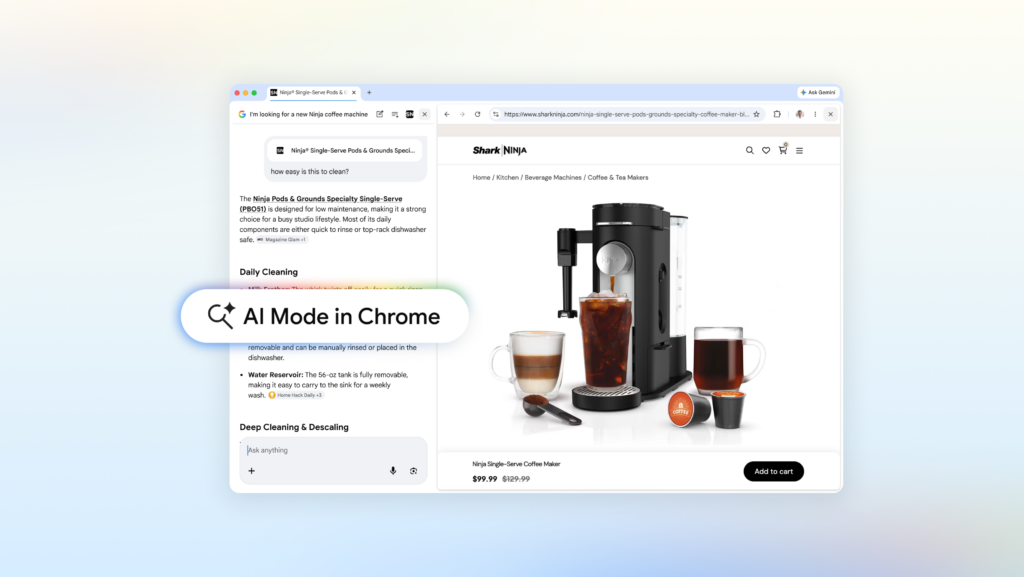
The headline change is that clicking a link in AI Mode now opens the webpage alongside your search results instead of replacing them. On desktop, this means you can read an article and still see your AI Mode conversation, ready for follow-up questions. No more losing context when you chase a rabbit hole.
Google’s example is shopping for a coffee maker. You ask AI Mode for something compact that makes lattes, get a few options, click one, and the retailer’s site opens next to your search. You can ask “How easy is this to clean?” and AI Mode pulls context from both the page you’re looking at and the broader web to answer. That’s genuinely useful, and it’s the kind of thing that makes me less annoyed at having to do research for purchases.
Another example: learning about McLaren Racing teams and pit crew training. You can explore their official site without breaking your flow, then ask follow-up questions in real-time. The early testers apparently loved not having to constantly switch tabs, which tracks with my own experience.
Searching across your open tabs
There’s another feature here that’s less flashy but maybe more useful day-to-day. You can now search across the Chrome tabs you already have open. On both desktop and mobile, there’s a new “plus” menu in the search box on the New Tab page (or within AI Mode itself) that lets you select recent tabs and add them to your search.
You’re not limited to just tabs either. You can mix in images or files like PDFs. So if you’re researching hiking trails and have several sites open, you can add those tabs to your search and ask for similar kid-friendly trails in a different location. Or if you’re studying for a stats midterm, you can bring in your class notes, lecture slides, and academic papers all at once.
What this actually means
This is Google finally acknowledging that search isn’t a single query event. It’s a conversation with the web, and that conversation involves jumping between sources, comparing information, and iterating on your questions. The old model of “type query, get ten blue links, open one, close it, type another query” was broken.
AI Mode with side-by-side browsing and cross-tab search is a step toward fixing that. It’s not perfect—I’m sure there will be edge cases where the AI doesn’t pull the right context, and I’m skeptical about how well this works on mobile with limited screen real estate. But the direction is right.
The bottom line
If you’re the kind of person who regularly has fifteen tabs open and feels a mild panic when Chrome crashes, this update is for you. It won’t solve all your tab-hoarding habits, but it might make the research process less painful. And that’s more than I can say for most Chrome features.
AI Mode is rolling out now on Chrome desktop and mobile. Give it a try the next time you’re deep in a research rabbit hole. You might find yourself closing a few tabs for once.
Comments (0)
Login Log in to comment.
Be the first to comment!